Skip to content

DispatchesΒΆ

Git Submodules Deep Dive for Platform Engineering

Platform engineering teams face a recurring challenge: shared code. You have a library of Terraform modules that ten product teams consume, a set of Ansible roles that every configuration management pipeline needs, or a collection of CI/CD workflow templates that must stay consistent across dozens of repositories. The naive solution is to copy files between repositories, but then every fix requires propagating changes to every consumer by hand. Git submodules offer a structured alternative: embed one Git repository inside another as a tracked dependency with an explicit, auditable version reference.

This post covers how submodules work at the Git level, how to add and consume them, the day-to-day operations that platform engineers and DevOps practitioners need to know, CI/CD automation with GitHub Actions, and the common pitfalls that cause teams to abandon submodules prematurely.
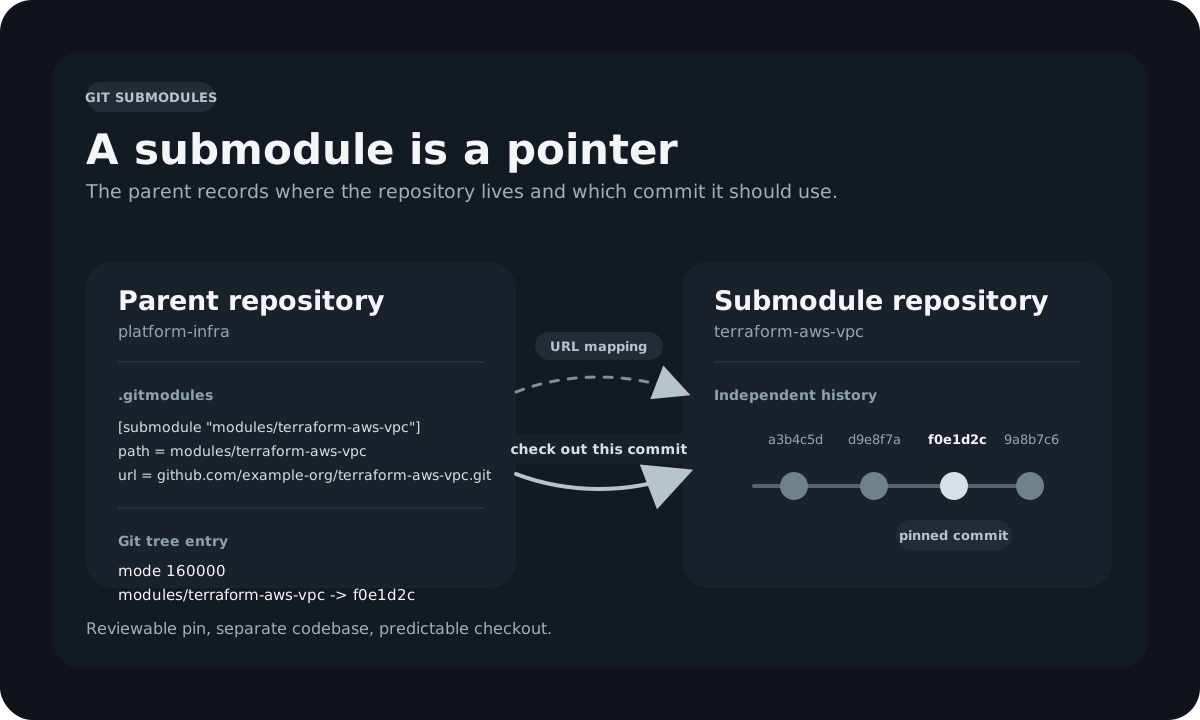
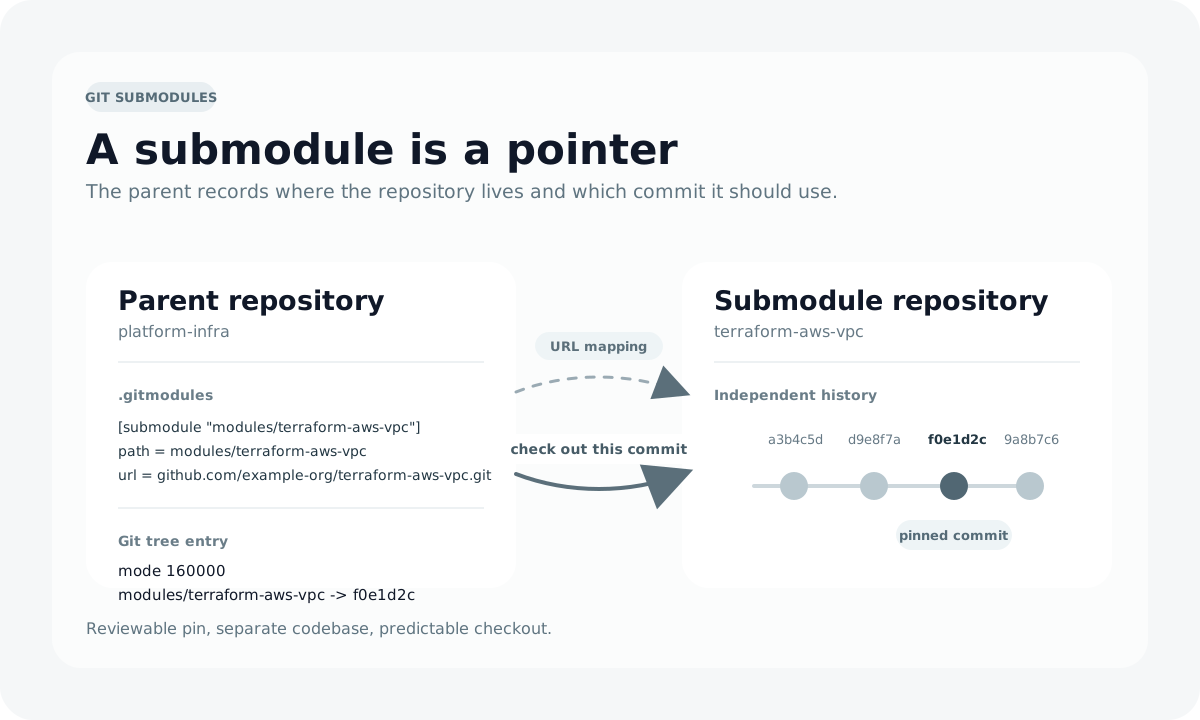
Git submodules mental model: the parent repository stores a gitlink commit pointer, not the submodule's files. Git submodules mental model: the parent repository stores a gitlink commit pointer, not the submodule's files.

Lost in Shades of I'm Okay

This piece contains discussion of depression and hopelessness. Please read with care.

There is a particular meanness to depression.

It doesn't always arrive like a storm. More often it comes like summer heat: slow, saturating, difficult to argue with. It settles into the walls, into the body, into the space between one thought and the next, until everything feels heavy with it. The house seems to take it in. Even the light looks tired by the time it reaches the room.

I have known days when the floor felt like the safest place to keep my eyes. Old wood, scarred and splitting, honest in its damage. Floorboards don't ask anything of you. They don't expect performance. They don't require you to explain why lifting your head feels like lifting stone. Looking down became a kind of prayer then, if prayer can be made out of exhaustion. I studied every crooked crack as if it might tell me how to stay in one piece. Lost in shades of "I'm okay."

Oh My Zsh on macOS: A Reference for a Clean, Maintainable Shell

% omz version
             __                                     __
      ____  / /_     ____ ___  __  __   ____  _____/ /_
     / __ \/ __ \   / __ `__ \/ / / /  /_  / / ___/ __ \
    / /_/ / / / /  / / / / / / /_/ /    / /_(__  ) / / /
    \____/_/ /_/  /_/ /_/ /_/\__, /    /___/____/_/ /_/
                            /____/

    master (061f773)

If you spend a large part of your day in a terminal, your shell stops being just a shell and starts becoming part of your development environment. On my Mac, that environment is built around Zsh, Oh My Zsh, the Spaceship prompt, and a small set of plugins that improve the things I do constantly: Git, GitHub, containers, Kubernetes, Terraform, Python, Go, and Ansible. The result isn't flashy for the sake of being flashy. It's a shell that surfaces useful context quickly, stays out of the way when I'm focused, and is still simple enough to maintain without turning ~/.zshrc into a junk drawer.

Managing Stale Issues and Pull Requests with GitHub Actions

Every open-source project eventually faces the same problem: issues and pull requests that were once active go quiet. A bug report with no updates in a year. A pull request that was never finished. A feature request that the contributor lost interest in. These threads accumulate over time, and before long a repository's issue tracker becomes a graveyard of items that no one knows are still relevant.

The actions/stale GitHub Action gives maintainers a way to address this automatically. It scans issues and pull requests on a schedule, labels anything that has gone too long without activity, warns contributors that it will be closed soon, and closes it if no activity follows. The whole process is configurable and runs without manual intervention.

This post covers what the action does, how to configure it, a real-world example from one of my own projects, and the tradeoffs so you can decide whether it makes sense for yours.

Ignoring Files in Git with .gitignore

Every Git repository accumulates files that should never be committed: compiled binaries, dependency directories, editor configuration, operating system metadata, and local environment files that contain secrets. Without a mechanism to exclude them, every git status output and git add . command becomes a manual filtering exercise. The .gitignore file is Git's built-in fix. Once you understand its pattern syntax, scope rules, and debugging tools, most of the "why is this file showing up?" confusion goes away.

Tracking Empty Directories in Git with .gitkeep

Git tracks files, not directories. That distinction is easy to overlook until you run into the consequence: an empty directory you create locally simply doesn't exist after a fresh clone. No staging, no commit, no push will capture it, because Git has nothing to work with. The .gitkeep convention is the common workaround for this behavior, and it requires nothing more than a single empty file placed inside the directory you need to preserve.

Controlling Git Repository Behavior with .gitattributes

A .gitattributes file lets you assign attributes to file paths in a Git repository, giving you explicit control over how Git handles those files during checkouts, merges, diffs, and archives. Line ending inconsistencies, corrupted binary diffs, merge conflicts in generated files, and bloated archive packages are all problems that a good .gitattributes file prevents before they reach your team.

Managing GitHub Repository Settings with Probot Settings

GitHub repository settings can be managed through the web UI, the REST API, or the gh CLI. Default branch, merge strategies, issue tracking, vulnerability alerts, labels, branch protection rules: however you change them, you get no audit trail tied to your repository, no peer review process, and no straightforward way to reproduce the configuration in another repository without repeating the same steps manually.

The Probot Settings app solves that problem by treating repository configuration as code. You commit a .github/settings.yml file to your repository, and the app syncs its contents to GitHub's API every time the file changes. The settings are versioned, reviewable, and repeatable.

This post covers how the app works, how to install it, what it can configure, and how to structure a settings.yml file that covers the settings I apply to every project.

Please Format Your Code Blocks: GitHub Issue Etiquette

You're a maintainer. You've carved out thirty minutes between meetings to work through the open issues on your project. You open the first one. The title is promising. The reporter clearly hit a real bug. And then you see it: a wall of unformatted YAML, raw Terraform, and shell output, all smooshed together into a single paragraph, every newline stripped, every indentation gone, triple-quoted strings collapsed into nothing, angle brackets eaten by the Markdown renderer. You can't tell where the config ends and the error begins.

You close the tab.

If you're a maintainer, you've lived that moment.

If you're a contributor, please keep reading, because this post is for you, and it'll help your issues get more attention.