If you spend hours a day in your editor, your setup stops being a cosmetic preference and starts becoming part of how you think. Mine has evolved into a very opinionated VS Code environment tuned for the work I do most often: Go, Python, PowerShell, Ansible, Terraform, Markdown, YAML, JSON, and a steady stream of GitHub-driven automation.
A pull request template improves the quality of proposed changes, but it only helps after someone has already made it to the solution stage. GitHub issue forms solve the earlier problem: they shape the information you collect when someone reports a bug, asks for an enhancement, or suggests a documentation fix. In that sense, they're the natural companion to a pull request template, and for many repositories they do even more to reduce maintainer back-and-forth.
Pull request templates help contributors explain a proposed change.
Issue template help contributors explain a problem, an idea, or a gap before any code has been written.
That distinction matters, because most maintainer time is lost much earlier in the process: missing reproduction steps, missing environment details, vague enhancement requests, and documentation issues with no concrete suggestion.
This piece includes themes of loss, grief, and hard mercy. Please proceed with care.
There are places in the South where mercy rots before it ripens. You can feel it in the sag of a porch beam, in the black water holding still beneath the cypress knees, in the red clay that clings to a boot like a hand unwilling to let go. Even in winter the land keeps its fever. Spanish moss hangs from the trees like old church lace gone gray with grief. Cicadas are long dead by January, but their husks still cling to fence posts and bark, the empty shape of a thing that sang itself raw and left its shell behind.
This is the country of crumbling sheds and cedar slats silvered by weather, where small lives are counted at daybreak and losses are folded into chores before breakfast. The air smells of ping, wet straw, heat, stale prayer, and the sour sweetness of something too long confined. Somewhere a mother lowers her voice because the truth sounds uglier spoken aloud. Somewhere a father studies the ground as though judgment might be written in the red clay. Before anything happens, you already know everybody here has inherited something they did not choose and will not escape.
A repository security policy is one of those documents that people often add because GitHub expects it, not because they have thought through what it needs to do. That is how you end up with policies that say little more than "email us if you find a problem" or, worse, tell researchers to open a public issue for a vulnerability report. An effective security policy is not a box-checking exercise. It is an operational document: it tells security researchers how to contact you safely, tells users which versions you still support, and tells everyone what kind of response process they can reasonably expect.
This post walks through how to write a security policy that is actually useful on GitHub: what sections it needs, how specific to be, which mistakes to avoid, and a practical SECURITY.md template you can adapt for your own repositories. The goal is not just to help you publish the file, but to help you publish one that will still read as clear, credible, and operational when someone actually needs it.
Useful beyond GitHub, too!
Although this post focuses on GitHub, most of the guidance applies equally well to GitLab and other source hosting platforms. The platform-specific details, such as where the policy is surfaced and how private vulnerability reporting works, may differ, but the core job of a security policy stays the same: define a private reporting path, set expectations, and make support boundaries clear.
A GitHub repository does not become a healthy community just because the code is useful. The moment other people begin opening issues, commenting on pull requests, or submitting patches, you have a social space to maintain as well as a technical one. A code of conduct is the document that defines what kind of community you are trying to build, what behavior is expected, and what happens when those expectations are ignored.
The best code of conduct files are not there for optics. They are there to reduce ambiguity. They tell contributors what respectful participation looks like, give maintainers a clear basis for moderation, and provide a reporting path when something goes wrong. Done well, they make a project safer, more predictable, and easier to contribute to.
golangci-lint is one of the highest-leverage tools in the Go ecosystem because it turns a loose collection of static analysis tools into a single, fast, repeatable code-quality gate. Used well, it catches real bugs, reduces review noise, and helps maintainers keep a project consistent without turning style preferences into endless pull request commentary.
For many Go teams, the mistake is not adopting golangci-lint. The mistake is adopting it without a strategy. Enabling too many linters at once, tolerating unexplained //nolint comments, or treating the default output as a substitute for judgment quickly turns a useful signal into background noise.
This post walks through how golangci-lint works, how I think about configuring it for a real project, and how to run it in ways that are practical for both day-to-day development and long-term open source maintenance.
Much of what I know about golangci-lint was learned the unglamorous way: maintaining Go-based open source projects where lint output has to hold up in front of contributors, CI systems, release processes, and real users. That includes work across HashiCorp Terraform providers, HashiCorp Packer plugins, and Go SDKs.
That context matters because this is not an abstract "here are the docs" walkthrough. It is an opinionated maintainer's view of what actually keeps linting useful in a long-lived Go codebase.
There is a kind of performance that no longer feels like performance because you have been doing it so long that it has settled into your bones.
Each morning arrives with its own familiar ritual: the steady voice, the practiced calm, the expression that says, "I belong here." After enough years, it becomes automatic. People hear you speak, ask for your judgment, trust what you have to say. Your name appears on work that matters.
From the outside, it can look like certainty.
But beneath all of that, there can still be a quieter voice saying something else entirely:
"Today will be the day they figure out I don't belong here after all."
It has a name, of course: Imposter Syndrome. That old habit of treating your own record like disputed evidence.
That voice is stubborn. It doesn't yield easily to experience, praise, or proof. It survives accomplishment with an almost insulting ease. It can sit in the same room with a long career, meaningful work, and the respect of other people, and remain completely unimpressed.
I've spent most of my professional life inside the orbit of very large institutions, places whose names carry their own kind of weather.
On paper, my record isn't especially mysterious. I've held serious roles. I've contributed to products and open source projects people actually use. I've written extensive designs and documentation that helped people do their jobs. I've even written a book. I've earned certifications and accreditations, sometimes less out of ambition than out of a private need to quiet the voice that keeps insisting I've not done enough. I've stood in rooms where others came to listen, and I've spoken at more technology conferences than I could name without stopping to count, somehow managing not to waste their time.
Shipping a polished release for a software project by hand gets old fast: building for multiple platforms, packaging archives, generating checksums, publishing GitHub releases, cutting container images, and updating a Homebrew tap is exactly the kind of repetitive work that should not depend on memory or heroics.
GoReleaser turns that whole workflow into a repeatable release pipeline that scales from your first CLI to a heavily used open source project.
Not Just for Go-based Project Releases
Despite the name, GoReleaser supports releasing for Go, Python, Rust, Zig, and TypeScript based projects.
Manual releases often seem manageable at first, then turn into a mess the moment users ask for macOS support, ARM builds, checksums, containers, or a one-line brew install experience. Maintainers end up writing ad hoc shell scripts, copying files into GitHub Releases by hand, and hoping the version embedded in the binary matches the git tag they just pushed.
GoReleaser solves that by treating release engineering as configuration. You describe what to build, package, sign, and publish, then let one command, or one CI job, do the same thing every time. It handles the boring parts well enough that you get to focus on your project instead of your release checklist.
Manual terminal recordings tend to age badly. The timing is inconsistent, the cursor jumps, the window size changes between takes, and the one command you needed to correct means starting over. If you have ever tried to capture a polished CLI walkthrough for a README, release note, or docs site, you have probably spent more time re-recording than documenting.
VHS from Charm (a.k.a., Charmbracelet) fixes that by turning terminal demos into source code. Instead of screen recording your desktop, you write a small .tape file that describes the terminal session: window size, theme, typing speed, commands, pauses, screenshots, and output format. Then VHS renders the result into a GIF, MP4, WebM, or even a directory of raw frames.
There are two hard parts in terminal documentation:
Capturing a terminal session that looks clean and readable.
Keeping that session reproducible as the tool, docs, and CLI output evolve.
Traditional recording tools help with the first part, but not the second. A hand-recorded GIF is an artifact, not a build input. Once it drifts from reality, you either live with stale docs or record it all over again.
VHS treats terminal demos the same way we treat infrastructure, tests, and CI workflows: as code.
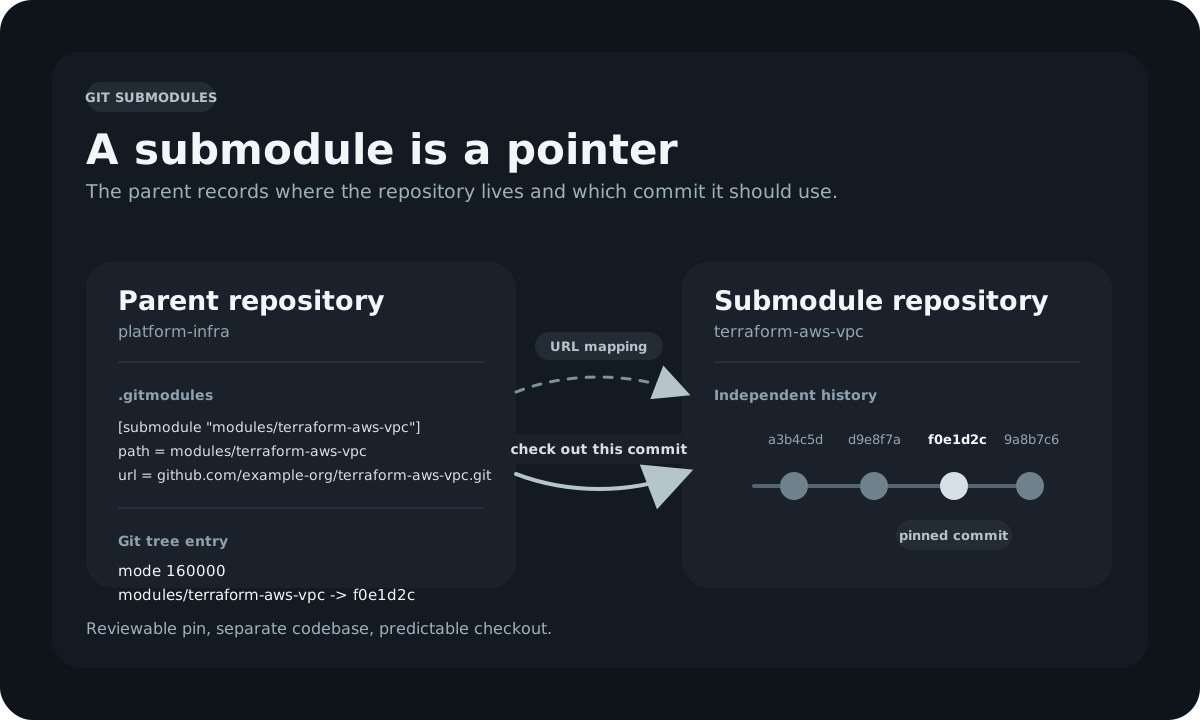
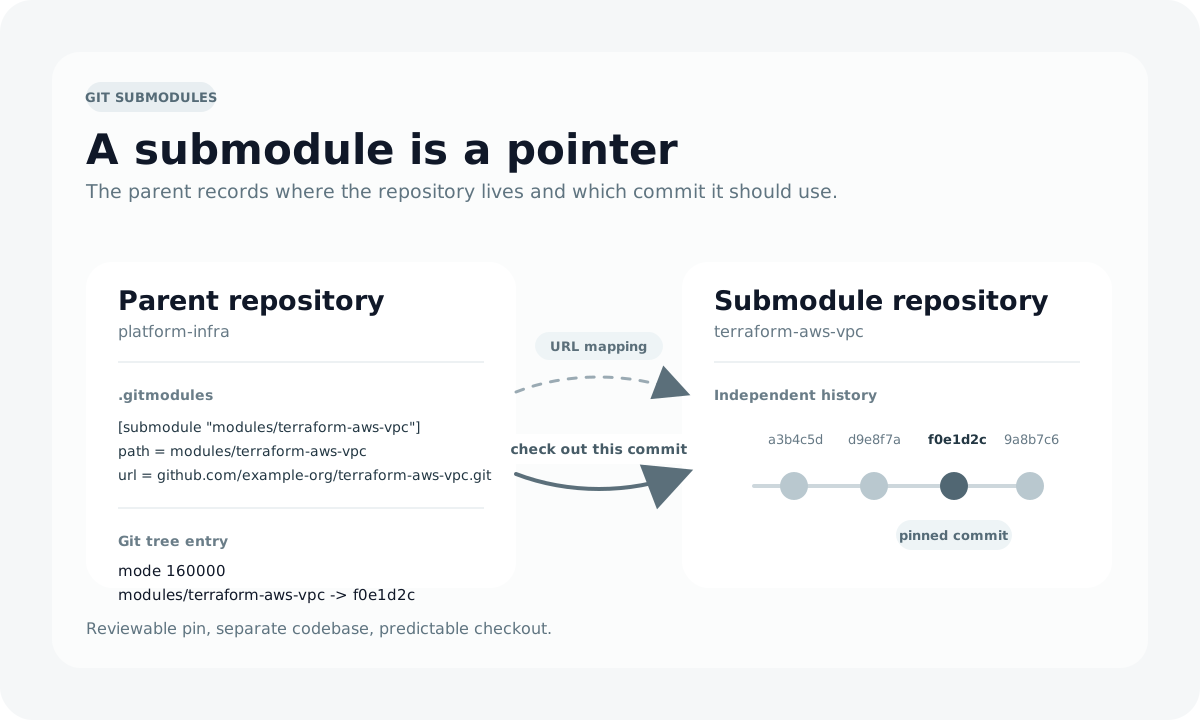
Platform engineering teams face a recurring challenge: shared code. You have a library of Terraform modules that ten product teams consume, a set of Ansible roles that every configuration management pipeline needs, or a collection of CI/CD workflow templates that must stay consistent across dozens of repositories. The naive solution is to copy files between repositories, but then every fix requires propagating changes to every consumer by hand. Git submodules offer a structured alternative: embed one Git repository inside another as a tracked dependency with an explicit, auditable version reference.
This post covers how submodules work at the Git level, how to add and consume them, the day-to-day operations that platform engineers and DevOps practitioners need to know, CI/CD automation with GitHub Actions, and the common pitfalls that cause teams to abandon submodules prematurely.