Git Submodules Deep Dive for Platform Engineering
Platform engineering teams face a recurring challenge: shared code. You have a library of Terraform modules that ten product teams consume, a set of Ansible roles that every configuration management pipeline needs, or a collection of CI/CD workflow templates that must stay consistent across dozens of repositories. The naive solution is to copy files between repositories, but then every fix requires propagating changes to every consumer by hand. Git submodules offer a structured alternative: embed one Git repository inside another as a tracked dependency with an explicit, auditable version reference.
This post covers how submodules work at the Git level, how to add and consume them, the day-to-day operations that platform engineers and DevOps practitioners need to know, CI/CD automation with GitHub Actions, and the common pitfalls that cause teams to abandon submodules prematurely.
How Git Submodules Work
Before reaching for the git submodule commands, it is worth understanding what Git is actually doing. The mental model matters because it explains both why submodules are useful and why they behave the way they do when something goes wrong.
The .gitmodules File
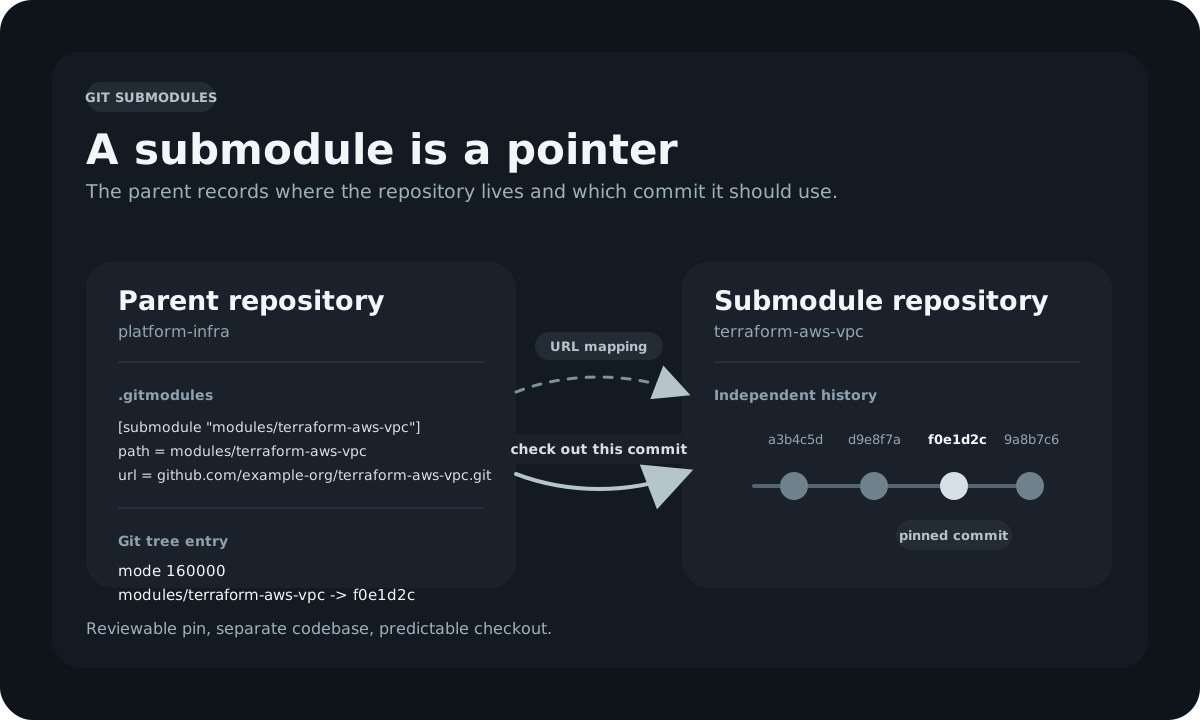
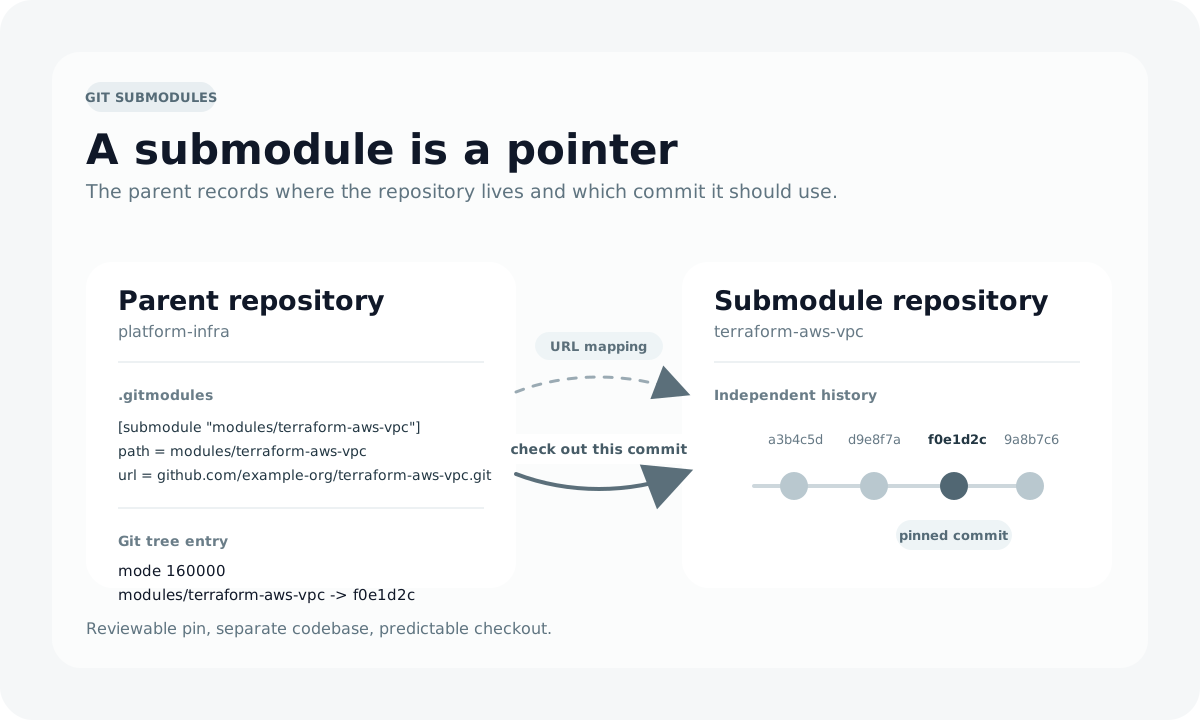
When you add a submodule to a repository, Git creates a .gitmodules file in the repository root. This file records the mapping between a path inside your repository and the URL of the submodule's remote:
[submodule "modules/terraform-aws-vpc"]
    path = modules/terraform-aws-vpc
    url = https://github.com/example-org/terraform-aws-vpc.git
The .gitmodules file is version-controlled alongside your code. Every contributor who clones your repository gets the same submodule declarations. Adding or removing a submodule is a tracked change, visible in the log, reviewable in a pull request, and revertible just like any other change.
Submodule Entries Are Commit Pointers
The single most important thing to understand about submodules is what the parent repository stores. It does not store the submodule's files. It stores a commit SHA that points to a specific commit inside the submodule's repository.
In the parent repository's object store, a submodule appears as a special tree entry with mode 160000, called a gitlink. When you run git log on the parent, you see diffs like this:
-Subproject commit a3b4c5d6e7f8a9b0c1d2e3f4a5b6c7d8e9f0a1b2
+Subproject commit f0e1d2c3b4a5968778695a4b3c2d1e0f9a8b7c6d
That change represents the parent repository intentionally advancing (or pinning) the submodule to a different commit. The submodule's history, branches, and tags are all independent. The parent simply says: "when this repository is checked out, clone the submodule and check out exactly this commit."
This design has a direct consequence: updating a submodule to a newer version is a deliberate, reviewable act. It cannot happen silently behind your back. That property is exactly what platform engineering teams need when managing shared dependencies.
The .git/config File
In addition to .gitmodules, each submodule has an entry in the repository's .git/config after initialization:
[submodule "modules/terraform-aws-vpc"]
    url = https://github.com/example-org/terraform-aws-vpc.git
    active = true
This local copy of the submodule configuration can differ from .gitmodules. The git submodule sync command copies the URL from .gitmodules into .git/config, which is useful when a submodule has moved to a new remote URL and you need to propagate that change to contributors who already have the old URL in their local configuration.
Adding a Submodule
The Basic Command
If you omit the path, Git uses the repository name from the URL. It is better to be explicit. For example, to embed a shared Terraform VPC module at modules/terraform-aws-vpc:
This command:
- Clones the submodule repository into
modules/terraform-aws-vpc - Creates or updates
.gitmoduleswith the new entry - Stages both
.gitmodulesand the gitlink entry for the submodule directory
The working tree now contains the submodule's files at the specified path, and two changes are staged and ready to commit:
On branch main
Changes to be committed:
  (use "git restore --staged <file>..." to unstage)
    new file:   .gitmodules
    new file:   modules/terraform-aws-vpc
Commit them together:
Pinning to a Specific Commit or Tag
By default, git submodule add leaves the submodule checked out at the tip of the default branch. For production infrastructure, that is rarely what you want. Pin the submodule to a specific release tag immediately after adding it:
cd modules/terraform-aws-vpc
git checkout v2.1.0
cd ../..
git add modules/terraform-aws-vpc
git commit -m "chore: pin terraform-aws-vpc to v2.1.0"
The parent repository now records the exact commit that v2.1.0 points at. If the tag is later moved in the upstream repository (which is uncommon but possible), the parent repository is not affected. The commit SHA is immutable.
Use Commit SHAs for Maximum Reproducibility
Tags can be deleted or moved. If your platform requires strict reproducibility, record the full commit SHA rather than a tag reference. You can note the tag in a comment inside the commit message:
Adding Multiple Submodules
Large platform repositories often manage several shared dependencies. Each submodule is added and pinned independently:
git submodule add https://github.com/example-org/terraform-aws-vpc.git modules/terraform-aws-vpc
git submodule add https://github.com/example-org/terraform-aws-eks.git modules/terraform-aws-eks
git submodule add https://github.com/example-org/ansible-roles.git roles/common
After adding all of them, the .gitmodules file will contain an entry for each:
[submodule "modules/terraform-aws-vpc"]
    path = modules/terraform-aws-vpc
    url = https://github.com/example-org/terraform-aws-vpc.git

[submodule "modules/terraform-aws-eks"]
    path = modules/terraform-aws-eks
    url = https://github.com/example-org/terraform-aws-eks.git

[submodule "roles/common"]
    path = roles/common
    url = https://github.com/example-org/ansible-roles.git
Cloning a Repository That Contains Submodules
The Problem with git clone Alone
Running a plain git clone on a repository that contains submodules creates the submodule directories but leaves them empty. The .gitmodules file is present, but no submodule content is fetched:
git clone https://github.com/example-org/platform-infra.git
cd platform-infra
ls modules/terraform-aws-vpc/
# (empty)
This surprises new contributors and breaks CI pipelines that do not explicitly initialize submodules.
Clone with --recurse-submodules
The cleanest solution is to pass --recurse-submodules at clone time:
Git clones the parent repository, then immediately initializes and fetches every submodule at the commit the parent records. If any of those submodules themselves contain submodules (nested submodules), those are also initialized recursively.
Initializing Submodules in an Existing Clone
If you or a contributor has already cloned without --recurse-submodules, run:
This is functionally equivalent to --recurse-submodules at clone time. The --init flag copies the submodule entries from .gitmodules into .git/config. The --recursive flag handles nested submodules. Without --recursive, only the top-level submodules are initialized; any submodules of submodules are left empty.
Add an Alias for Convenience
Running git submodule update --init --recursive is verbose. Many engineers add an alias to their global git configuration:
After that, git sub initializes all submodules in any repository.
Everyday Submodule Operations
Checking Submodule Status
The git submodule status command shows the current commit recorded in the parent for each submodule and whether the working tree matches:
 a3b4c5d6e7f8a9b0c1d2e3f4a5b6c7d8e9f0a1b2 modules/terraform-aws-vpc (v2.1.0)
 f0e1d2c3b4a5968778695a4b3c2d1e0f9a8b7c6d modules/terraform-aws-eks (v1.4.2)
+d1e2f3a4b5c6d7e8f9a0b1c2d3e4f5a6b7c8d9e0 roles/common (heads/main)
The prefix character indicates status:
| Prefix | Meaning |
|---|---|
| Working tree matches the recorded commit |
+ | Working tree is at a different commit than the parent records |
- | Submodule has not been initialized |
U | Submodule has merge conflicts |
The + on roles/common above means someone has run git checkout inside that submodule directory and moved it to a different commit. The parent repository still points at the old commit. Either commit the update to the parent or run git submodule update to restore the recorded commit.
Updating Submodules After Pulling
When you pull changes to the parent repository that advance a submodule pointer, the submodule directory in your working tree is left at the old commit. Running git submodule update brings it forward:
Or combine both steps into a single command:
This is the command to build into your daily workflow. It pulls the parent and then updates all submodules to the commits the new parent state records. Missing this step after a pull is one of the most common sources of confusion with submodules.
Fetching New Content from Upstream
git submodule update checks out the commit the parent records. It does not fetch new commits from the submodule's remote. To fetch the latest commits from upstream and advance the submodule to the tip of its tracked branch, use git submodule update --remote:
This contacts the submodule's configured remote, fetches new objects, and checks out the tip of the tracked branch (or the default branch if no branch directive is set in .gitmodules). The parent repository is not automatically updated: the submodule pointer will show a + prefix in git submodule status, indicating the working tree has moved ahead of what the parent records. Inspect the result and then stage and commit the update to the parent if you want to advance the pin.
Iterating Over All Submodules with foreach
The git submodule foreach command runs a shell expression inside each submodule directory. This is indispensable for bulk operations:
# Fetch new commits for all submodules without changing what the parent records
git submodule foreach 'git fetch origin'

# See which branch each submodule is on
git submodule foreach 'git branch --show-current'

# Run git log on each submodule to see recent history
git submodule foreach 'git log --oneline -5'
The foreach command is particularly useful in scripted platform tooling where you need to apply a consistent operation across all dependencies.
Tracking Branches vs. Pinned Commits
This is one of the most consequential design choices when adopting submodules. The two strategies have fundamentally different trade-offs.
Pinned Commits: Maximum Stability
The default behavior: the parent records a specific commit SHA. Every checkout produces exactly that code. Updates are explicit, deliberate, and code-reviewed. This is the right choice for production infrastructure code, versioned product releases, and any situation where reproducibility is non-negotiable.
# .gitmodules - pinned to a specific commit (no branch directive)
[submodule "modules/terraform-aws-vpc"]
    path = modules/terraform-aws-vpc
    url = https://github.com/example-org/terraform-aws-vpc.git
Advancing the pin is a tracked operation:
cd modules/terraform-aws-vpc
git fetch origin
git checkout v2.2.0
cd ../..
git add modules/terraform-aws-vpc
git commit -m "chore: upgrade terraform-aws-vpc to v2.2.0"
The upgrade produces a regular commit in the parent repository, with a full diff showing the old and new commit SHAs. That diff can be reviewed, merged via pull request, and reverted if the new version causes problems.
Branch Tracking: Convenience at a Cost
Git supports a branch directive in .gitmodules that makes git submodule update --remote advance the submodule to the tip of the named branch:
[submodule "roles/common"]
    path = roles/common
    url = https://github.com/example-org/ansible-roles.git
    branch = main
With this configuration, running git submodule update --remote roles/common pulls the latest commit from main in the ansible-roles repository. This is convenient for internal shared libraries where the team wants to stay on the latest version automatically, but it eliminates the stability guarantee. A breaking change merged to main in the submodule immediately affects every consumer who updates.
Branch Tracking in Production
Reserve branch tracking for internal libraries under the same team's control, where breaking changes are coordinated. Never use branch tracking for external dependencies or for any shared code that multiple product teams consume independently. A breaking change at an inopportune moment will create an incident during a freeze or release.
The safer middle ground for internal libraries is to use release tags rather than branches. Tag each breaking change as a new version, then advance the parent's pin explicitly.
Making Changes Inside a Submodule
Editing code inside a submodule from the parent repository requires understanding that the submodule is a fully independent Git repository. Work in the submodule follows the same branch, commit, and push workflow as any other repository.
The Detached HEAD Problem
When Git checks out a submodule, it puts it in a detached HEAD state: the working tree is at a specific commit, but not on any branch. Any commits you make in this state are technically orphaned; they exist in the object store but are not reachable from any branch.
To make changes inside a submodule, first create or check out a branch:
cd modules/terraform-aws-vpc

# Check what you are on
git status
# HEAD detached at a3b4c5d

# Create a new branch for your changes
git checkout -b feature/add-secondary-cidr

# Make your changes
# ...

# Commit inside the submodule
git add .
git commit -m "feat: support secondary CIDR blocks"
Pushing Submodule Changes
After committing inside the submodule, push its changes to its own remote before updating the parent repository:
# Push the submodule changes first
cd modules/terraform-aws-vpc
git push origin feature/add-secondary-cidr

# Go back to the parent
cd ../..

# Stage the updated submodule pointer
git add modules/terraform-aws-vpc
git commit -m "chore: advance terraform-aws-vpc to feature/add-secondary-cidr"
git push
Push the Submodule Before the Parent
If you push the parent repository's updated submodule pointer before pushing the submodule itself, other contributors who pull and run git submodule update will encounter an error: the commit the parent references does not exist on the submodule's remote. Git has a safeguard for this:
This makes git push fail if any submodule has unpushed commits that are referenced by the parent. A stricter variant:
This automatically pushes any modified submodules before pushing the parent. Make it the default by setting it in your global configuration:
Creating a Pull Request in the Submodule
Changes to shared submodules should go through the submodule's own code review process. Open a pull request against the submodule's repository, have it reviewed and merged, then tag a new version. After the version is published, advance the parent repository's pin through its own pull request.
This two-step process gives both the submodule maintainers and the parent repository maintainers a chance to review the change independently.
Removing a Submodule
Git does not have a single git submodule remove command (though recent versions of Git have added git rm support that handles much of this automatically). The safest approach:
# Stage the removal of the submodule path
git rm modules/terraform-aws-vpc

# Remove the submodule's cached working tree
rm -rf .git/modules/modules/terraform-aws-vpc

# The .gitmodules entry is removed automatically by git rm
# Verify the .gitmodules and .git/config entries are gone
grep -A3 "terraform-aws-vpc" .gitmodules  # should produce no output
grep -A3 "terraform-aws-vpc" .git/config   # should produce no output

# Commit the removal
git commit -m "chore: remove terraform-aws-vpc submodule"
If the .git/config entry was not cleaned up automatically, remove it manually:
Verify the .git/modules Directory
The .git/modules/ directory caches submodule repositories locally. Leaving stale entries there does not cause failures immediately, but re-adding the same submodule path in the future will fail with a confusing error unless the cached directory is removed. Clean it up proactively when removing a submodule.
Synchronizing Submodule URLs
When a submodule repository moves to a new URL (a common event with organization renames, migrations from GitHub to GitLab, or domain changes), update the URL in .gitmodules and then sync it to each contributor's local .git/config:
# Update the URL in .gitmodules
# (edit the file or use git config)
git config --file .gitmodules submodule.modules/terraform-aws-vpc.url \
  https://github.com/new-org/terraform-aws-vpc.git

# Sync the change from .gitmodules to .git/config for the current checkout
git submodule sync --recursive

# Update the submodule to the new remote
git submodule update --init --recursive

# Commit the .gitmodules change
git add .gitmodules
git commit -m "chore: update terraform-aws-vpc remote URL after org rename"
Contributors who pull this commit then need to run git submodule sync --recursive locally to update their .git/config before git submodule update will work against the new URL.
CI/CD Automation with GitHub Actions
Automated pipelines require careful handling of submodules. The two most important considerations are: making sure the submodule content is available, and ensuring the pipeline is not broken by a missing --recurse-submodules at checkout.
Basic Checkout with Submodules
The actions/checkout action supports submodules natively via the submodules input:
name: CI

on:
  pull_request:
  push:
    branches:
      - main

permissions:
  contents: read

jobs:
  validate:
    name: Validate
    runs-on: ubuntu-latest
    steps:
      - name: Checkout
        uses: actions/checkout@de0fac2e4500dabe0009e67214ff5f5447ce83dd # v6.0.2
        with:
          submodules: recursive

      - name: Run Terraform Validate
        run: |
          terraform init -backend=false
          terraform validate
Setting submodules: recursive is equivalent to running git submodule update --init --recursive after the clone. Use true (non-recursive) only when you know there are no nested submodules; use recursive as the default to be safe.
Accessing Private Submodule Repositories
Public repositories can be checked out without additional configuration. Private submodules require credentials. The cleanest approach on GitHub is to provide the checkout action a token with access to both the parent and the submodule repositories:
name: CI

on:
  pull_request:
  push:
    branches:
      - main

permissions:
  contents: read

jobs:
  validate:
    name: Validate
    runs-on: ubuntu-latest
    steps:
      - name: Checkout
        uses: actions/checkout@de0fac2e4500dabe0009e67214ff5f5447ce83dd # v6.0.2
        with:
          submodules: recursive
          token: ${{ secrets.SUBMODULE_ACCESS_TOKEN }}
The SUBMODULE_ACCESS_TOKEN secret should be a fine-grained personal access token or a GitHub App installation token with contents: read permission on every submodule repository. Organization-level secrets are the right place to store this so that every repository in the organization can use it without per-repository configuration.
For internal platform repositories where all repos are in the same GitHub organization, a GitHub App with a machine-user token scoped to the organization is more maintainable than managing personal access tokens tied to individual engineers' accounts.
Dependency Update Automation with Renovate
Manually updating submodule pins is tedious and easy to forget. Renovate supports git submodules natively. Add the gitSubmodules preset to your renovate.json to receive automated pull requests when submodule upstreams publish new tags:
{
  "$schema": "https://docs.renovatebot.com/renovate-schema.json",
  "extends": [
    "config:recommended",
    "gitSubmodules"
  ]
}
With this configuration, Renovate opens a pull request every time a tracked submodule publishes a new version, including the diff of the commit pointer change and a summary of the changelog if one is available. Platform teams can review and merge those pull requests on a schedule rather than tracking upstream releases manually.
Validating Submodule Consistency in CI
A useful guard for repositories where submodules should always track tagged releases is a CI step that checks whether any submodule is on a detached HEAD pointing at an untagged commit:
      - name: Check Submodule Pins
        run: |
          git submodule foreach --quiet \
            'git describe --exact-match HEAD 2>/dev/null || \
            (echo "Submodule $name is not pinned to a tag" && exit 1)'
This fails the pipeline if any submodule is checked out at a commit that does not correspond to a tag, surfacing accidental branch-tip references before they reach production.
Platform Engineering Use Cases
Git submodules align well with specific patterns in platform engineering and DevOps. These are the scenarios where the trade-offs favor submodules over alternatives.
Shared Terraform Modules
Infrastructure-as-code platforms often maintain a central library of Terraform modules. Each product team's repository consumes those modules as submodules, pinned to specific versions. When the platform team publishes a security patch or a new feature, product teams advance their pins through pull requests, which creates an audit trail of which version each deployment uses and when it was updated.
platform-infra/
├── .gitmodules
├── modules/
│   ├── terraform-aws-vpc/        # submodule: v2.1.0
│   ├── terraform-aws-eks/        # submodule: v1.4.2
│   └── terraform-aws-rds/        # submodule: v3.0.1
├── environments/
│   ├── prod/
│   │   └── main.tf               # references ../../../modules/terraform-aws-vpc
│   └── staging/
│       └── main.tf
└── README.md
The version history in platform-infra shows exactly when each module version was adopted, by whom, and through which pull request. Reverting to a previous module version is a single git revert followed by git submodule update.
Shared Ansible Collections and Roles
Ansible automation platforms face the same problem. A central repository of roles for hardening, monitoring agent installation, and certificate management can be embedded as a submodule inside each product team's playbook repository. The role maintainers publish tagged releases and product teams advance their pins explicitly.
# In the product team's playbook repo
git submodule add https://github.com/example-org/ansible-hardening-roles.git roles/hardening
cd roles/hardening
git checkout v1.3.0
cd ../..
git add roles/hardening .gitmodules
git commit -m "feat: embed ansible-hardening-roles v1.3.0"
CI/CD Template Libraries
Organizations that centralize GitHub Actions workflow templates or reusable composite actions can distribute those templates via submodules. A ci-templates repository with standardized lint, test, and deploy workflows can be embedded in application repositories, ensuring every team uses the organization's approved and maintained pipeline patterns.
Documentation and Content Reuse
Documentation-as-code platforms sometimes embed shared reference content: API specification fragments, compliance control narratives, or product-level architecture decision records that appear in multiple documentation sites. Submodules make it possible to include a specific version of that shared content without duplicating it.
Common Pitfalls and How to Avoid Them
Forgetting to Push the Submodule First
The most frequent mistake. You commit inside the submodule, update the parent's pointer, and push the parent. Colleagues pull and run git submodule update. Git contacts the submodule's remote and cannot find the referenced commit. The solution is to configure push.recurseSubmodules = on-demand globally:
Forgetting --recurse-submodules After Cloning
New contributors clone the repository, open a file that imports something from a submodule path, and encounter a missing file error. Resolve this by making the initialization step visible: add it to the project README.md, a Makefile, or a Taskfile:
Leaving a Submodule on Detached HEAD Unintentionally
After git submodule update, the submodule is on detached HEAD at the recorded commit. If you make commits without first checking out a branch, those commits are orphaned and will be garbage-collected eventually. Always check the state before editing:
cd modules/terraform-aws-vpc
git status
# HEAD detached at a3b4c5d
git checkout -b fix/correct-tag-output  # create a real branch first
Not Staging the Submodule After Updating It
After advancing a submodule pointer, many engineers forget to git add the submodule directory before committing:
# Wrong: parent still points at the old commit
cd modules/terraform-aws-vpc
git checkout v2.2.0
cd ../..
git commit -m "chore: upgrade to v2.2.0"   # missing git add!

# Correct
cd modules/terraform-aws-vpc
git checkout v2.2.0
cd ../..
git add modules/terraform-aws-vpc           # stage the pointer update
git commit -m "chore: upgrade terraform-aws-vpc to v2.2.0"
Nesting Submodules Too Deeply
Git supports recursive submodules, but nesting beyond one level creates significant operational complexity. Each level multiplies the number of repositories that must be initialized, fetched, and kept in sync. If you find yourself building a tree of submodule dependencies more than one level deep, consider whether a package manager or a monorepo approach better fits the problem.
Using Submodules for Frequently-Changing Code
Submodules add overhead to every update: fetch the new commits, advance the pointer, open a pull request in the parent, get it reviewed and merged. For dependencies that change multiple times per day, this cycle is too slow. Use a package registry (npm, PyPI, Go modules, Terraform Registry) for fast-moving dependencies. Reserve submodules for pinned dependencies that change deliberately and infrequently.
Quick Reference
Initial Setup
# Clone with submodules
git clone --recurse-submodules <url>

# Initialize submodules in an existing clone
git submodule update --init --recursive

# Add a global alias
git config --global alias.sub 'submodule update --init --recursive'

# Always push submodules before the parent
git config --global push.recurseSubmodules on-demand
Adding and Removing
# Add a submodule
git submodule add <url> <path>

# Pin to a tag immediately after adding
cd <path> && git checkout <tag> && cd ../..
git add <path> .gitmodules
git commit -m "feat: add <name> submodule at <tag>"

# Remove a submodule
git rm <path>
rm -rf .git/modules/<path>
git commit -m "chore: remove <name> submodule"
Daily Operations
# Pull parent and update submodules in one step
git pull --recurse-submodules

# Check submodule status
git submodule status

# Fetch upstream without advancing the parent pointer
git submodule update --remote <path>

# Run a command in every submodule
git submodule foreach '<command>'
Advancing a Submodule Version
cd <submodule-path>
git fetch origin
git checkout <new-tag-or-commit>
cd ../..
git add <submodule-path>
git commit -m "chore: upgrade <name> to <version>"
git push
Synchronizing After a URL Change
# Update URL in .gitmodules, then:
git submodule sync --recursive
git submodule update --init --recursive
git add .gitmodules
git commit -m "chore: update <name> remote URL"
Submodules are not the right answer for every shared-code problem, but for platform engineering teams managing versioned infrastructure modules, shared automation roles, and controlled dependency updates across many repositories, they provide auditability and reproducibility that package registries cannot match at the repository layer: every dependency update is a code-reviewed commit, every version is a SHA, and rollback is a single git revert. The patterns above, combined with sensible global configuration and a well-integrated CI pipeline, make submodules a practical and reliable foundation for platform dependency management.